Coding at Home: May 12th, Starting Your Camera

Join us today at 1pm, Irish time on Twitch!

Homework

Well, it’s all homework, at the moment, at least here in Ireland.

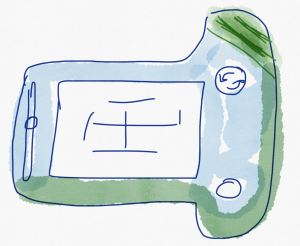
But last night’s homework was to finish, as best you can, your design for your camera.

Ideally you’ve spent time in the init method for your MyCamera class, in this section:

It’s going to require adding the components you need at the right Point on the screen and the right Size.

Remember the grid, with the 0,0 point in the center:
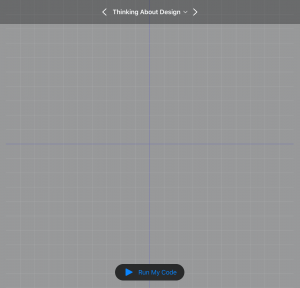
x coordinates to the right are zero to 500, and to the left are zero to minus 500 . y coordinates from the center up are zero to 500, and from the center down at zero to minus 500.

If you get stuck, try sketching them out on paper.

Today’s Session

We will work more with connecting our camera buttons and view finders and wiring it all up. We’ll talk about how the messages are sent, which is a big organizational component of programming.

And we’ll review styling our components and how we get things close to our design while also making the thing functional.
Tune in at 1pm to try it out!

Coding at Home: May 11th: Assembling Your Camera, Continued

We’re back on Twitch today at 1pm after our more personalized Lookback Session Friday!

Recap

Last week was a big one.

We moved into much more complex territory with the Assemble Your Camera playground. The app we built in the Lights, Camera, Code playground was a huge accomplishment, but now we move even closer to the type of code you would write to build your own iPhone or iPad app.

We also held our first Lookback Session, which is designed for beginners and where we help you get set up a little more personally.

Today’s Session

Today we’re going to be back building our camera to our own design.

We’ve started laying out the code in our MyCamera class, which we’ll go over again today as a refresher.

We also started laying out the elements of our design on the screen, which meant lots of tweaks to which Point(x:,y:) we used and which Size(width:, height:).

As best as we can, we’ll also walk through that a little today, too, though everyone’s design will differ a little bit. Some will be more ambitious than others, but we’ll work on getting our elements in roughly the right spots, design-wise, and then get our camera functional before coming back for some polish!

We’ll see you at 1pm, Irish time!

Coding at Home: Lookback Session #1, Hello, Byte

Today we kick off the first of our lookback sessions, designed for coders of all experience.

We’ll be covering the Hello, Byte playground.

We *won’t* be broadcasting this session on Twitch today, because this session is going to be a little more interactive with the students.

Feel free to register at https://ti.to/the-code-hub/lookback-session-may-8th/en so I can send you the details of the session and we can get coding!

Coding at Home: The First Lookback Session TOMORROW (May 8th)

Tomorrow (Friday, May 8th) we’re going to hold our first loopback session.

The Goal of this Session

The goal of this session is to allow folks who are maybe joining us later than from the very start, people who are finding the latest sessions far too into the deep end, or people who want a bit of practice to join in a live session with us and others to get the feel of a real, in-person class.

We’re taking registrations on https://ti.to/the-code-hub/lookback-session-may-8th/en simply to get you the details for the video piece of the class. The sessions, themselves, will be free, just like our live stream on Twitch.

We’ll be holding the class over Zoom, and we’ll be giving out the details to those who have registered, simply to have an idea of numbers and to better interact with students if (and when) you have questions.

We’ll be holding the class over Zoom, and we’ll be giving out the details to those who have registered, simply to have an idea of numbers and to better interact with students if (and when) you have questions.

The Material

To prepare for the session, make sure you’re set up like in our Coding at Home video. The key is to have Swift Playgrounds downloaded and, ideally, the Hello Byte playground.

I really hope you’ll take advantage of the session, I’m looking forward to seeing those already registered tomorrow.

We’ll see you tomorrow at 1pm!

Coding at Home: May 7th, Classes and Cameras, Part 2

Code with us at 1pm, Irish time today!

Swift Student Challenge

First off, the big news yesterday was the announcement of the World-Wide Developer Conference’s dates and the Swift Student Challenge. These are Apple’s big developer events of the year, and the student challenge is a great way to show off your work.

If you’re stuck on your idea or want advice on how best to get going, feel free to drop us a note on the discussion board or at [email protected]!

Classes

Yesterday we took a brief tour through classes, which are yet another way for us to organize our code.

We started off building our own class hierarchy, and we’re going to discuss that again today. It’s an important concept, used throughout the Apple frameworks, so we’ll spend the first half or so of our session going over this concept, and then the rest going back to our MyCamera class to start customizing the look and feel of our camera.

Classes, like Types, are just a blueprint to structure our code. In our Animal case, the Animal class defines certain properties and behaviors all animals will have.

We can then create instances of that blueprint to use in our application. Our blueprints can inherit certain properties from other blueprints, so we could easily make a Dog blueprint by taking advantage of all the work we already did for the Animal blueprint.

We’ll walk through this and more today on the live session!

See you at 1pm!

Coding at Home: May 6th, Classes and Cameras

Join us today for some more live coding at 1pm, Irish time!

Recap

We started our designs for a camera, both from a visual point of view and from a coding point of view.

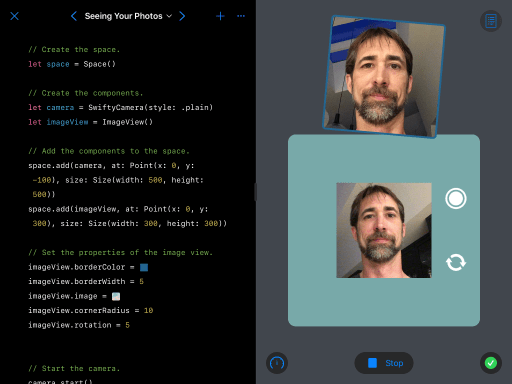
Yesterday we began looking at the class for our own Camera, which we saved in a file called MyCamera.swift. The class is our template for organizing our code for a camera type that will let us (or others) write code like this and have an instance of our own design for a camera:
let camera = MyCamera()

You might remember that we covered types way oh way back in April… This will be great practice, and if you don’t remember, don’t worry! We’ll go through creating our class, designing it, and using it all over again.

WWDC

Yesterday, our buddy Tim announced the dates for the annual WWDC, or Worldwide Developer Conference for Apple. One of the highlights of the show has always been the student-focused component. This year, they’re looking for your Swift Playgrounds, which is right up your alley, given you’ve been doing this class!

If you want help or advice on what you might submit, given all we’ve covered, feel free to drop us a line on the discussion board or at [email protected].

https://developer.apple.com/wwdc20/swift-student-challenge/

Today’s Session

Today we’re going to talk a bit more about classes, because there were some new wrinkles in the code we saw yesterday.

For one, we’ll talk a little about inheritance.

In this diagram, our Animal class is our base class. It has two subclasses: Dog and Cat. The superclass for the Dog class is Animal.

But we’ll go through all of that today, and create a few classes of our own along the way.

See you at 1pm!

Coding at Home: May 5th, Design Our Own Camera

Join us live to day at 1pm, Irish time, on Twitch!

Lights, Camera, Code

There’s still a lot to explore and play with in the Lights, Camera, Code playground, including showing off your own layout for your photoboard.

If you have an amazing design, we would love to see it! Feel free to post it to the Photoboard section of the discussions board. Or email it to us to [email protected].

Today’s Session

Today’s session will be another facet of app development: design.

Assemble Your Camera

And I don’t mean just drawing pictures on the screen. We’ll start thinking about how we want our camera to function, what features it will have.

Of course, there is an element of visual design to today’s session. You can use the built-in Notes app, Tayasui Sketches, or I’ll be using Paper by WeTransfer today to do some sketching of my design.

We’ll learn what elements we need to consider for our camera and how they impact how we want our camera to function.

We’ll also learn that (visual) design in not my particular forté! 🙂

We’ll see you at 1pm!

Coding at Home: May 4th, A Camera Recap

Catch us today at 1pm, Irish time!

Last week

Last week we built a camera that could take pictures from the front or back camera. We took the image when the shutter button was pressed and showed it on the screen in an ImageView component. Then we saved that photo to an album we created with code in the Photos app on your iPad.

This is an incredible amount of work. And we got there in a week. If you found it hard or sometimes confusing, we’ll be going through the playground again today to refresh and retry certain things.

We’ve just begun to inch our way down towards the deep end of the pool. Everyone Can Code Puzzles is the gentle entrance to the pool, Lights, Camera, Code (which we did last week) is getting close to that rope between the deep end and the shallow, and this week we’re going to explore just beyond that rope, in the slopey part where we can still find our feet when we get in trouble.

Today’s session

Today we’ll spend most of the session on reviewing what we did last week and some extra touches to our photo board design. And then we’ll download the Assemble Your Camera playground and begin our very first intermediate playground. Fun times ahead!

Lookback Sessions

Because we’re now entering more advanced material, we wanted to give people a chance to still join the live session and not feel completely lost, or feel like they have to watch all the old videos for 18 hours straight (thanks for the idea, Niamh and Aran!).

So this Friday will be our first “lookback session.” We’ll be working through the Hello, Byte Swift Playground, which is aimed at beginners or people who want practice programming with other people online, live. The session will be on Twitch, as per usual, but I recommend registering (it’s free) so we have an idea of how many people are on, and also to interact with you at home a bit more.

But that’s for Friday. We’ll see you today at 1pm!

Coding at Home: May 1st, Decorating Photos

Join us live today at 1pm, Irish time.

Working with Photos

We’ve done an amazing, mind-blowing job so far. We’ve built a camera that takes pictures and shows them in an image view on the screen and we’ve saved the photos to an album in the Photos app on our iPad.

Today we’re going to work more with the photos we’ve taken and add some decorations to our photos. There is some code we could improve, as always, so we’re going to take a look at how we might code a little safer and take advantage of our newfound connection to the Photos app.

In the end, we’ll have a pretty impressive app. You’ve learned a whole new set of techniques and syntax for building apps. You’ve also practiced using stuff we learned back in Learn to Code 1 & 2.

So we’ll see you at 1pm! Make sure you’re looking good for your photos!

Coding at Home: April 30th

Today we’ll be streaming live from 1pm, Irish time!

Today’s Session

We got off to a roaring start with our very own camera app and image view yesterday with the Lights, Camera, Code playground.

We learned about a few new components that have been written especially for this playground: the Space, SwiftyCamera, and ImageView type. Just like our previous work in Everyone Can Code Puzzles, these types have properties and methods we can use to configure them how we like and perform certain functions.

We worked with the grid of the space for laying out our camera and image view components and sizing them, which is a whole new thing for us.

It brings us closer to app development, because laying out the interface people interact with is a large part of our work, and it is often composed of multiple components.

Today we’ll continue that work and add our pictures to a photo album in the Photos the iPad.

We’ll see you at 1pm today!