Coding at Home: Part Two

In Part One, we looked at a relatively painless way to talk about and experience variables.

Swift Playgrounds from The Code Hub

One of the other little tweaks we’ve just shipped is an update to our Text Adventure Playground. But let’s start with a little (re)introduction of Playgrounds, for the uninitiated.

If you didn’t already know, The Code Hub has a suite of Swift Playgrounds for use in the iPad (and now Mac!) Playgrounds app. When you download Playgrounds, which is a free download, you’ll see a bar along the bottom of the screen with the headline “More Playgrounds.”

More Playgrounds!

Apple provides an excellent array of playgrounds authored to teach you how to code, to learn augmented reality development. Or some innovative uses of content and code like the Cipher playground. The app is free, as are playgrounds you can download from Apple and third parties (like The Code Hub).

But if you are on an iPad and go to https://thecodehub.ie/playgrounds/ you can click on the Subscribe button to add The Code Hub’s suite of playgrounds to the app. Alternatively, on the Mac version of Playgrounds you can scroll to the bottom of the additional playgrounds and you’ll see the option to enter a subscription URL:

Enter in www.thecodehub.ie/playgrounds/feed.json and you’ll be good to go. You’ll see a confirmation dialog like this:


And, once you hit Subscribe, you’ll see a list of our playgrounds.


Right now, the 18th of March, 2020, we have six. I’ll try and touch on each of them in the next few weeks. But for now, you can download any of them onto your device and play around with them. There is a bit of explanatory text for each of the playgrounds, so you won’t be left completely at sea.

It helps to have a bit of Swift knowledge, but that, too, I’ll be touching on in the coming weeks.

Stay tuned.

Coding at Home: Part One

Well, it’s been a long time, but we’re still here, and in fact, we come bearing news.

While we’ve been stuck, pottering around the house, we improved a couple of our learning resources so that you, too, can use these to exercise your coding muscles!

Learning Variables

The first is our app, Learning Variables. We’ve long been using this app in our classrooms to help teach the concept of variables, but now we’ve released it for iPads, iPhones, and the Mac (thanks to Catalyst!).

There are a few built-in stories to start you off. Pick a story, and you’ll see a list of variables to fill in with some hints about what kind of value we’re looking for:

Enter in a few words according to the hint, and you’ll wind up with something like this:

It’s a little goofy exercise that will show students how variables can be used. They can go back and change what they entered and watch the story change. Or they can write their own story. We’ll rip out a few key words and create variables for students to fill in and re-generate their story with their new variable values in place. It’s handiest to have the kids write their own stories and then hand the devices around the classroom (or home) and see what their classmates (or siblings, parents, pets*) do to their stories… but I’d love to hear how you use it in your classroom (or home)!

If you have any requests or bugs, feel free to drop us a line at [email protected] and we’ll see what we can do.

* Please note, pets are terrible at coming up with values for these variables.

CESI Conference 2019: Using Swift Playgrounds for Creativity in Coding with the Code Hub

https://www.thecodehub.ie/cesi

I finally made it to CESI Conference, a gathering of educators across Ireland who are doing some inspiring stuff with and for their students. They’ve developed a supportive, engaged community of practice around the use of computers and technology and how they can be applied in teaching. This conference is a crown jewel (along with the CESI*CS meetups run by Dr. Millwood). Last year the beast from the east snowed out the conference and the makeup date fell on a date I just couldn’t make, and I had to back out of my planned talk on Turtle Graphics on the iPad.

Turtle Graphics on the iPad 2018

So I was delighted that this year’s conference theme was “Creativity, Collaboration, and Computers: Practitioner Perspectives” and that I had a good deal to talk about in that space. My talk on using cross-curricular Swift Playgrounds in your classroom is a way to introduce coding in a fun, creative way. Now, I was slightly less delighted when I had to shift my talk from the afternoon to the morning to try and make it back to Dublin for a poetry feis, especially as the shift happened after the schedules were printed, but the CESI staff were super accommodating. They even gave me an extra half an hour for my slot! And the attendees of the workshop were diligent in tracking me down from room to room. Some of them have careers as hunting dogs, should the teacher thing not work out.

Creative Coding

The talk part of the workshop went into my background and how the material for The Code Hub has grown over the years. The most compelling reason for me to start a new project isn’t coding for the sake of coding but it’s most often to solve a problem or scratch an itch I feel acutely, and the goal of the Swift Playgrounds I highlighted was to showcase a variety of problem-solving scenarios that might hook a student’s imagination.

We explored playgrounds related to the visual: turtle graphics, Apple’s Puzzle World and Learn to Code playgrounds.

We looked at a few playgrounds that are more text-based, like the Answers playground from Apple, the Shakespeare insult generator, my own Text Adventure playground, and a cool escape room-like playground from some educators in Spain.

The Cipher playground from Apple deserves a special call-out for its story-telling aspect and most approachable crypto content I think you’ll find anywhere.

We looked at playgrounds that use the iPad sensors like the Augmented Reality and the Sensor Create and Arcade playgrounds from Apple.

Because they’re adding things to or interacting things in the room in which they sit, these are great resources for paired (or more) use. I love the buzz in a classroom when we use these playgrounds as kids are up walking around, showing off the world they’ve superimposed on our own.

I’ll post the slides at some point in the near future, but in the meantime I’ve posted the links to the resources I used at https://www.thecodehub.ie/cesi.

So stop by, grab an iPad and subscribe to a few of the playground feeds listed there and try them out!

What is Computer Science?

You might think computer science is all about algorithms, arcane commands, and learning to think like a computer.

Learn to Code @ The Code Hub

Doug Winnie touches on a lot of these points with his article “Why You Need to Know More Than Coding to Master Computer Science”; computer science is far more than just coding.

I agree with him. Computer science and the way I teach it at The Code Hub is all about opening up new possibilities for the students. This includes Doug’s touchstones of creativity, abstraction, data, algorithms, programming, devices, and even global impact.

One of my favorite moments in the class is when a student inevitably asks the question, “Hang on a sec, can I write a game like <name the game of the moment> with code like this?” That’s usually the moment the kid applies the stuff they’ve learned thus far to their own creative endeavors.

Digital Summit Ireland

Along those lines, Learning Tech Labs is hosting the Digital Citizen Summit at the beautiful Science Gallery Dublin on April 28th. It’s designed to explore the human connections we can build online and what that means for how we behave online.

So if you’re interested in the world in which our kids are growing up, it’s worth your while checking out the summit (it’s free!). I think it’ll be an interesting discussion for kids and adults alike.

Learn to Code Starting April 3rd 2018 in Dun Laoghaire — SOLD OUT!

I was all ready to post an article about the class I’m running at the Mounttown Community Facility in Dún Laoghaire, but it SOLD OUT IN TWO HOURS. Drop us a note if you want to get notified when the next class is scheduled.

The Launch of Learn to Code in Ireland

The Code Hub

The inaugural Learn to Code class starts on April 3rd and runs for five Tuesdays (until the 1st of May). It’s from 6pm-8pm in the evening at the Mounttown Community Facility and is for kids ages 8-12.
We start with offline activities to teach the kids language and logic they need to use to talk to computers. We’ll dissect a few devices (a Raspberry Pi, an Apple Watch) to see what makes them tick, what makes them the same, in some ways, under the hood.
After that basic introduction, we jump into coding on iPads, which are provided. We program in Swift, which is the same language app developers can use to make iPhone and iPad apps. We’ll use a thing called turtle graphics. I’ve brought a version of this tool to the iPad. The ideas behind turtle graphics came out of some interesting work Seymour Papert and Cynthia Solomon did, which they wrote about in a book called Mindstorms: Children, Computers, And Powerful Ideas. It lets kids relate geometric concepts to real life movement and coding at the same time. It’s done in a way that lets them quickly build and explore on their own.

Turtle Graphics on the iPad
Turtle Graphics in action on the iPad

We progress onto more complex computer programming concepts and go into stuff like programming robots (I have two of these very cool robots from Sphero called SPRK+). We explore augmented reality, where they can drop a 3D fox into a real life environment. And then we check out some really cool programming with material from a colleague of mine that plots the voyage of the Titanic, famous battles in Ireland, and an augmented reality challenge that uses characters from Roald Dahl’s James and the Giant Peach.

So if that sounds interesting to your son or daughter, you can go sign up here: https://www.eventbrite.ie/e/learn-to-code-tickets-43405747760*
* Of course, the class is sold out, so you can’t sign up at the moment. Contact me and I’ll drop you a line when the next set of classes is scheduled.

80s Kids Started Coding Earlier than Millenials?

According to HackerRank’s 2018 Developer Skills Report, kids who grew up when computers first became home computers learned to code at an earlier age than kids today.

Logo in action. Image from https://blogs.msdn.microsoft.com/user_ed/2015/01/26/small-basic-the-history-of-the-logo-turtle/

I credit a lot of my success as a computer software engineer to a program called Project Expand, run in Massachusetts in the 80s. We were exposed to a lot of things we’d call STEM or STEAM today (for Science, Technology, Arts, and Math), including the LOGO and BASIC computer programming languages.
With LOGO you drove a little triangle around the screen with a relatively small number of commands. It made programming accessible, geometry tangible.  Continue reading “80s Kids Started Coding Earlier than Millenials?”

Dalkey CoderDojo: Swift Programming at Fitzpatrick Castle

After all the coding sessions we ran in and around town this autumn, we decided that a one-off CoderDojo session for the Dalkey Dojo would be worth running to see if we couldn’t interest a few new mentors to join and help us run future sessions.

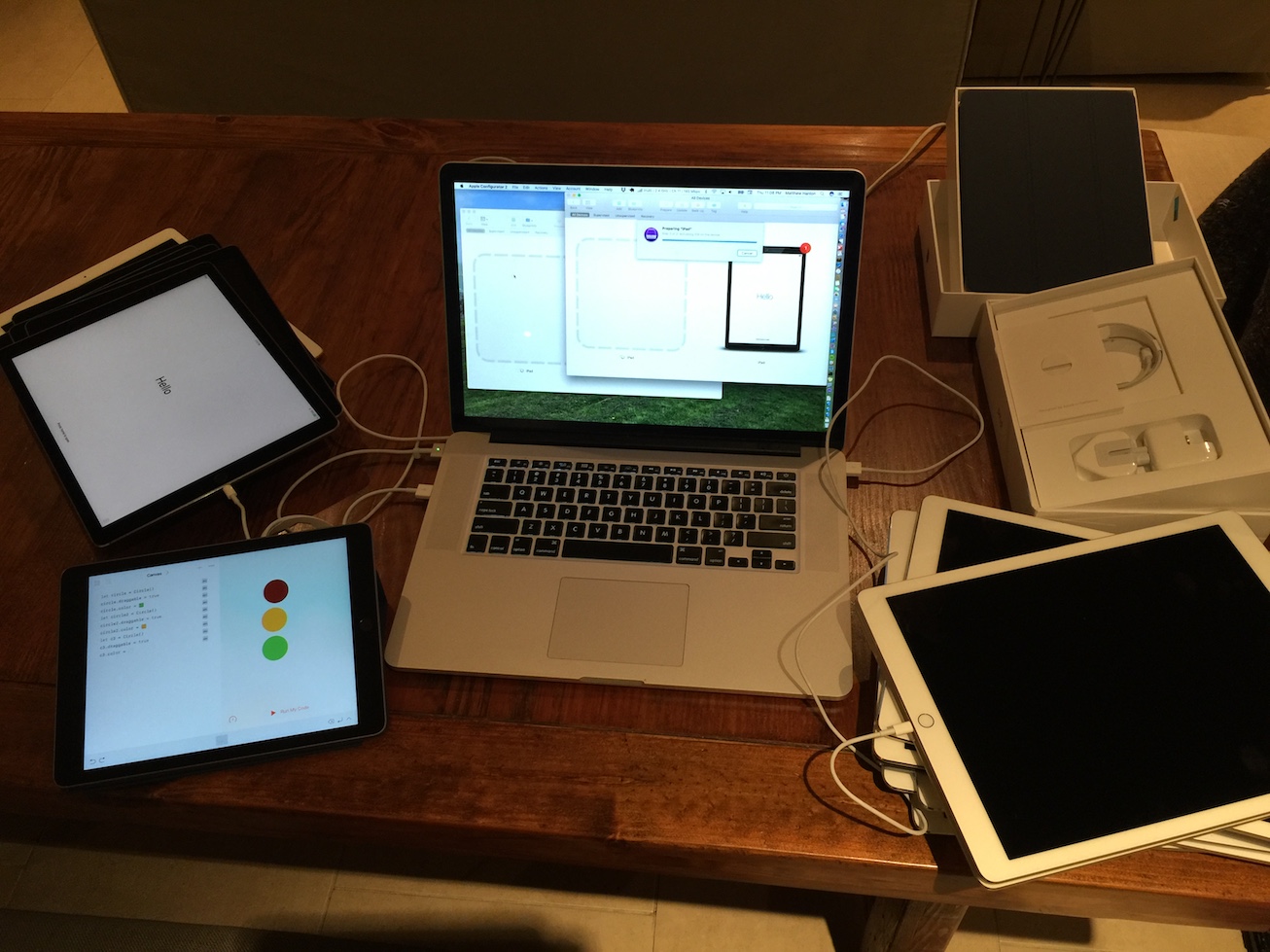
Setting up the iPads

I managed to borrow 15 beautiful 12.9″ iPad Pros off the folks at Apple and we booked a two hour session at the Fitzpatrick Castle Hotel, where we normally hold our sessions. But instead of an Arduino focus, which is the usual subject matter at the dojo, we were going to let the kids explore Swift and Swift Playgrounds:

The ninjas will be able to explore coding with Swift to a variety of ends. They can learn the fundamentals of coding, they will be able to use code to master drawing with simple commands, they can program a robot in a variety of ways, or they can play with augmented reality and code.
As far as material went, we used some of the new challenge cards Michael O’Kane developed, like the Titanic Journey Challenge, the Traffic Lights Challenge, and his cool Roald Dahl Challenge.

Our Swift Stations

In addition to those exercises, we had the new, just released Hour of Code Swift Playground to play with, the previous one, the Rock, Paper, Scissors playground (all of which you can get yourself when you add a new Swift Playground and go to the Challenges tab). We also had a couple Sphero SPRK+s, which were a huge hit with the kids (I only have two and had to implement a queue for the kids waiting somewhat patiently for the chance to play around with them). And then we had two playgrounds of my own making, the ARKit one with Max the fox, and my new Fundamentals of Programming Swift Playground.
All in all, it was a fun, programming-packed two and and half hours, even, if, by the last fifteen minutes or so we wound up with some programming fatigue and started getting creative in… other ways:

iPads, All the Way Down

European Code Week, Part Two

So in addition to the hour of code at Harold Boys’ National School in Dalkey, I also ran an hour of code event down at Loreto Primary School in Dalkey.

Loreto Primary School

This one happened after the excellent DojoCon2017 in Warrington, and was the capper on a pretty code-heavy month.

There was a ton of parental support – 10 parents! – which is always great to see, but we also covered 2nd class through 6th, a total of 10 classrooms full of students. Since we did Minecraft with them last year, I wanted to have them work on something a little different. The school is equipped with Microsoft and Samsung tablets, so I had them go back to the code.org well and we did the Anna and Elsa Hour of Code challenge for everybody except the second class (who got to do Minecraft).

Due to other commitments (like DojoCon and the other Hour of Code session in town), we didn’t do a presentation like last year, but instead I demo’d Max the fox, from my ARKit playground, and nearly got trampled each and every time as all the kids ran up to first see the fox and then stand in front of the camera so that their friends could see Max standing on top of them.

The girls were amazing, as were the parent volunteers, and I really appreciate the willingness and eagerness of all the teachers I’ve run into in these last two years to try something new out in the classroom and engage with the technology themselves, all in the name of exposing the students to new avenues of learning.

DojoCon 2017: App Development with Swift

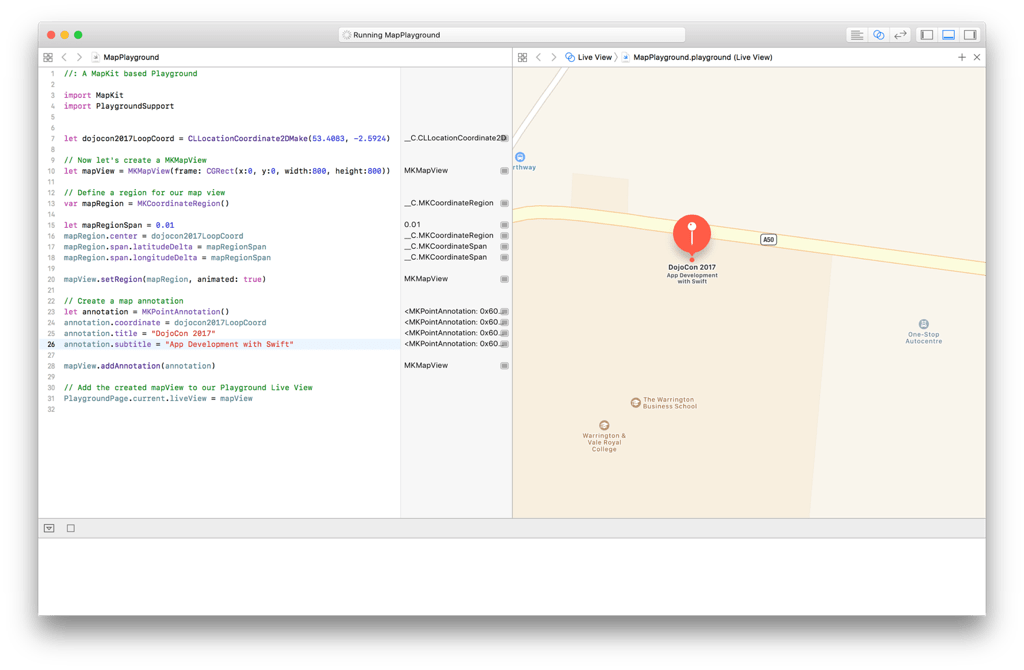
I was very lucky to attend DojoCon 2017 over in Warrington, in the UK a few weekends ago (quite a few, now), where I ran a workshop called Intro to App Development with Swift.

DojoCon 2017

The idea was that Apple have these fantastic resources you can download and explore, either on your own or guided by a teacher (or guiding, if you’re the teacher) at their Everyone Can Code website.

The App Development books (available for free on the iBookstore) come with teacher and student guides, both of which have project ideas and implementations to download to help you through learning how to develop apps for iOS.

So they kind of work, whether you’re using the material in your classroom (or with your kids at home) or in a Dojo, where the focus is more on projects and giving the kids more loose guardrails to travel down.

    • QuestionBot — Develop a personal assistant who will answer all your questions 🤖
    •  MemeMaker — Dazzle your buddies, frighten the cat with the memes you cook up! 🕶💥💕
    • Rock, Paper, Scissors — Build your own rock, paper, scissors game to play with your friends! 👊✋✌️
    • FoodTracker — Build your own food rating app for remembering those stellar meals!

All of these projects, bar the FoodTracker, are part and parcel of the App Development with Swift curriculum, and Food Tracker can be built according to the guided tour here: https://developer.apple.com/library/content/referencelibrary/GettingStarted/DevelopiOSAppsSwift

If you want to follow along with the stuff I walked the mentors through, now you can, with this handy sushi card at CoderDojo’s Kata website.

In fact, if you want more than just Xcode development, you can bring Swift into your Dojo with Michael O’Kane’s excellent challenge cards, as well, joint announced on the CoderDojo news page just a few days ago.

Musical Lights

I really like the demo Michael O’Kane highlighted  where someone has programmed two Sphero SPRK+s to flash their lights to U2’s “Pride (In the Name of Love)” with Swift Playgrounds.

I think it’s a great exercise.

But I was thinking, what if you could listen to the song with an AVAudioPlayer and react to the average power on each channel of the audio?

It’s a work-in-progress, but here’s what I have so far:

Musical Lights from Matthew Hanlon on Vimeo.